It’s Friday afternoon, you are the team lead of an airline app. You’ve been working for months on a chatbot experience. It will help your passengers and customers answer questions related to things like delays, refunds, gates, departures, arrivals, and more. This Friday feels a bit special: you just came from a pub where you celebrated many months of hard work. The app has been approved by management and your CTO, and IT has greenlit it as well.
After a well-deserved weekend, the app goes live on Monday. The team will be eagerly monitoring traffic and usage. You arrive on Monday and the app is launched. Flights tend to peak on Monday mornings, as this is a popular window for departures, and you just read in the newspaper that a strike is expected to happen on Monday. Suddenly, as you watch traffic and usage metrics while eating your breakfast 🍳, you start noticing that the average time for an answer from the chatbot skyrockets. After diagnosis you see users keep getting 429 — Too Many Requests from the server, and this is traced back directly to your Microsoft Foundry deployment. You’ve obviously planned for such a scenario and gracefully handled it in your backend: users just get the message “Sorry, the chatbot is currently experiencing high demand. Please try again in a few minutes.”, and you are monitoring the logs to see how many users are affected by this. Depending on the number of retries, some users simply experience a higher delay in the answer from the chatbot, while others just give up and leave the app. You are getting mixed feedback from users: some are understanding and patient, while others are frustrated and disappointed. You know that this is not a problem with your app design or implementation, but rather a limitation of the cloud infrastructure you are using. This just adds up to the strike and flight-delay frustration, and no later than tomorrow your app is in the news: “Airline chatbot fails to handle high demand during strike, customers left frustrated”. You are now in damage-control mode, trying to explain the situation to your management and customers while also looking for a solution to avoid this happening again in the future.
There was a solution that would have partially — if not mostly — solved this: Provisioned Throughput Units (PTU) on Microsoft Foundry.
What is PTU?
To understand PTU, you first need to understand why you get 429s in the first place. When you deploy a model on Microsoft Foundry, you can choose between two modes: pay-as-you-go (PAYG) or provisioned (PTU). PAYG is the default and the most common: your deployment shares a pool of Azure capacity with every other tenant in the region, and Microsoft enforces quota-based rate limits — tokens-per-minute (TPM) and requests-per-minute (RPM) — to keep that shared pool fair. The moment your traffic exceeds those limits, the service starts returning 429 Too Many Requests until the spike subsides.
This isn’t a Microsoft-specific quirk. Every hyperscaler (OpenAI, Anthropic, AWS Bedrock, Google Vertex, Mistral) does some version of the same thing — shared capacity has to be rationed somehow.
Provisioned Throughput Units (PTU) are the opposite model: instead of sharing, you reserve. A PTU is a unit of model compute capacity that Azure carves out exclusively for your deployment. With a PTU deployment you’re not competing with anyone else for capacity, and you’re not subject to PAYG’s TPM/RPM throttling — your ceiling is whatever you’ve provisioned.
I find flow analogies particularly helpful here.
Think of your deployment as a pipe between your client and the model, and each request as a drop of water flowing through it. The number of PTUs you’ve provisioned is the pipe’s diameter — it determines how much traffic can flow side-by-side at any given moment. Push more water than the pipe can carry and pressure builds up at the inlet; the overflow comes back as 429s.
So to handle more traffic, you make the pipe wider — i.e. you provision more PTUs. But there’s a catch: how wide you’re allowed to make it is governed by your quota. Quota is the maximum pipe diameter Microsoft permits you to install in a given subscription, region, and deployment type. It’s a ceiling, not a bill — you don’t pay for quota, you only pay for the PTUs you actually deploy against it. If you want a wider pipe than your current quota allows, you file a quota-increase request.
A wider pipe doesn’t make the water flow any faster — per-request latency is unchanged — it just means more requests can fit through at the same time before anyone has to wait. Think of the difference between riding a shared bus (PAYG) and owning a car (PTU): the bus may or may not have a seat when you need it and runs on its own schedule; your own car is always there.
Now let’s come back to our initial story. The reality of any production app is that you have a floor of demand you always need to meet, and spikes you have to plan for on top of it. How aggressively you plan for those spikes depends on your sector.
TikTok (for lack of a better example) needs to be on, always — so they almost certainly over-provision, because the business can’t afford to go down. The same applies to critical infrastructure: if lives depend on your service, you plan for well beyond any realistic peak. Our airline example sits somewhere in the middle: what was at stake was customer satisfaction and, ultimately, the airline’s reputation. How much of the peak you choose to cover is a strategic call, and it belongs with whoever owns the product (the PM, the engineering lead, the business owner — whoever signs off on the cost/risk tradeoff).
It’s almost never financially realistic to provision for every conceivable peak. A sensible baseline is to cover the floor demand — what you know you’ll serve 24/7 — and then cover a chosen percentage of the recurrent peaks. In our airline case the peaks come from strikes and travel disruptions; for a commuter-rail operator they’d be the morning and evening rush hours; for TikTok the “peak” is barely a peak at all because the floor is already close to the ceiling.
As you see, all roads lead to Rome, some just in different ways. Let’s talk about the different PTU strategies you can use to navigate this demand curve.
PTU strategies
Ultimately, it boils down to two routes: underspending (under-provisioning) and ramping up as you go, or overspending (over-provisioning). The former is more budget-friendly but risks 429s if your traffic spikes beyond your provisioned capacity; the latter is more expensive but gives you a buffer to handle unexpected surges without dropping requests.
Using the same airline-demand curve as before, here’s what each strategy looks like geometrically. The orange band is the part you should care about: with under-provisioning it’s traffic you’ll drop or spill onto PAYG, and with over-provisioning it’s paid-for headroom you didn’t use.
The steps towards PTU
Now that we have an understand of what PTU is and strategies around it, let’s go through the steps to get PTU for your deployment.
1. Compute how much PTU you need
First, go to Microsoft Foundry and open Operate.
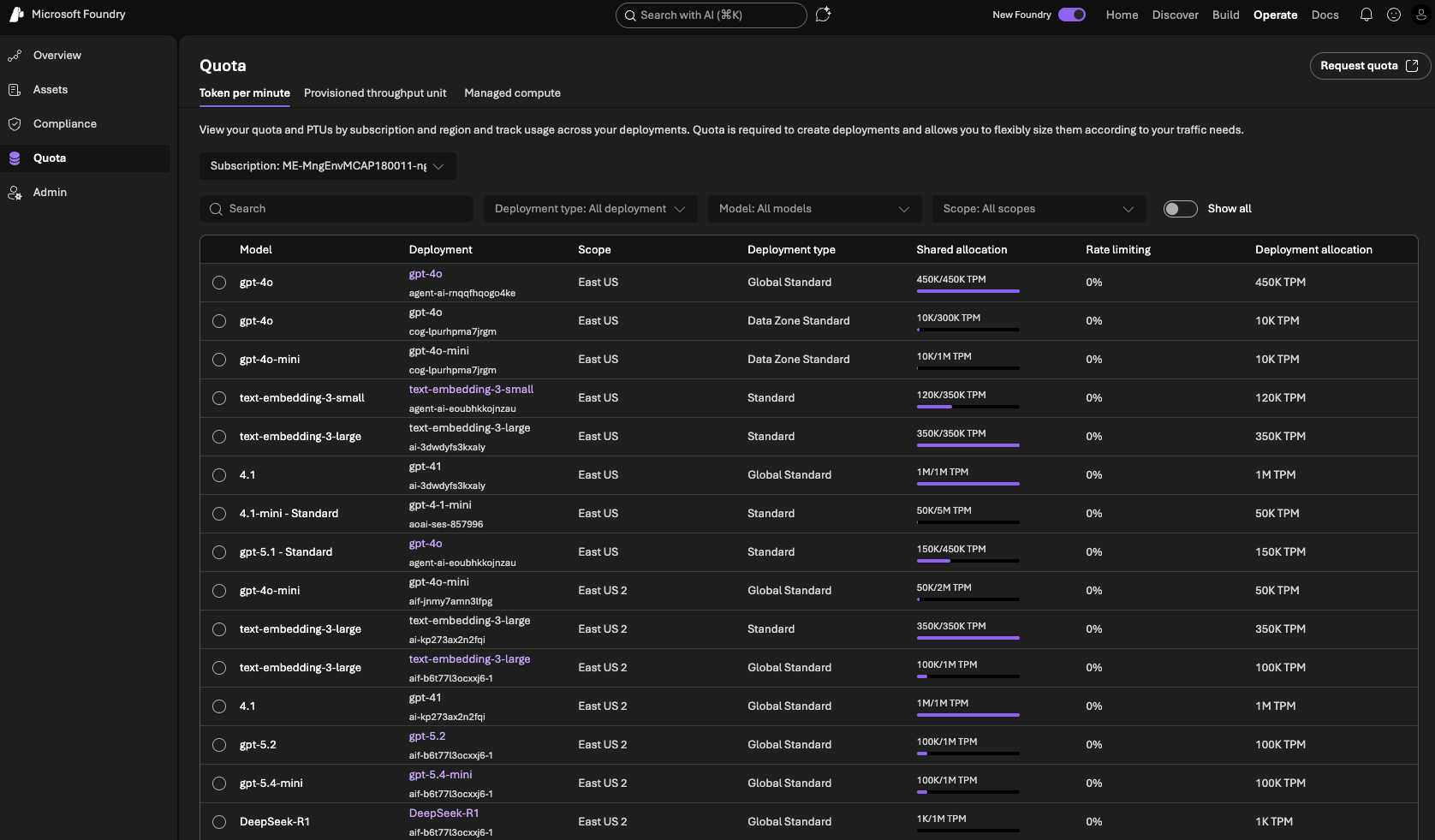
In this view, you can see your current deployments, PTU usage per deployment, total PTU usage for the subscription, and remaining regional quota.
To estimate the PTU you need, open the Provisioned Throughput tab.

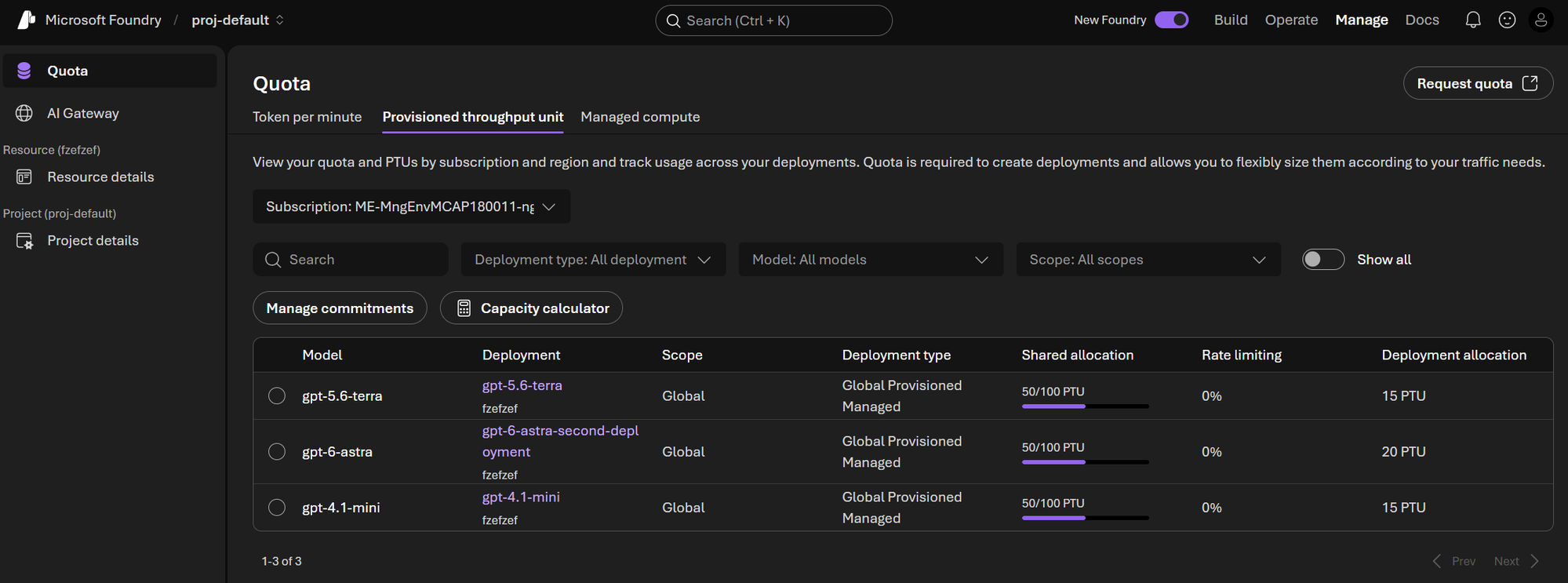
Then open the calculator. It starts with pre-defined workloads. Depending on your architecture, you may have multiple models in play, but in many cases this can be simplified to a single primary workload.
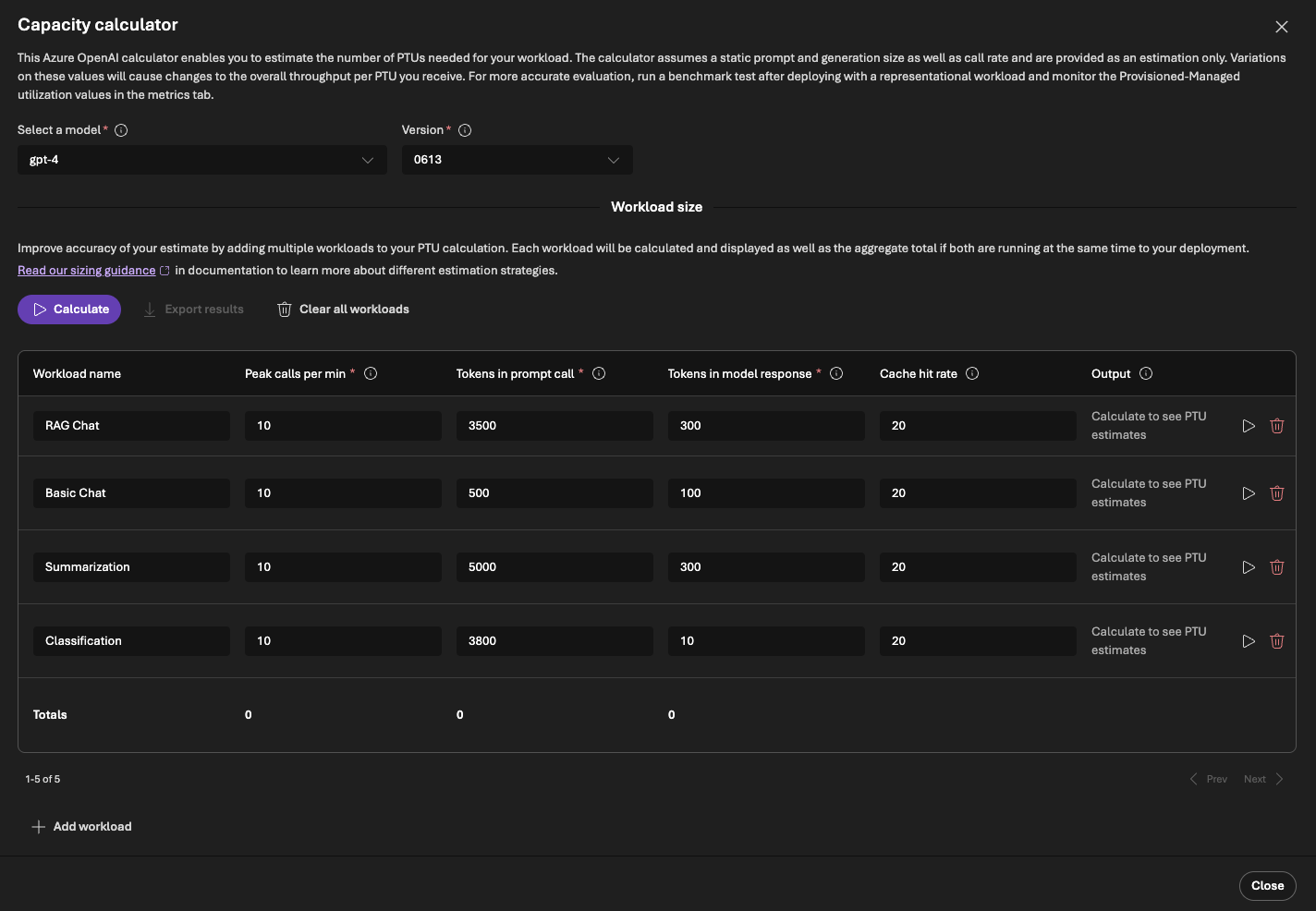
After simplifying, you might end up with one main workload.
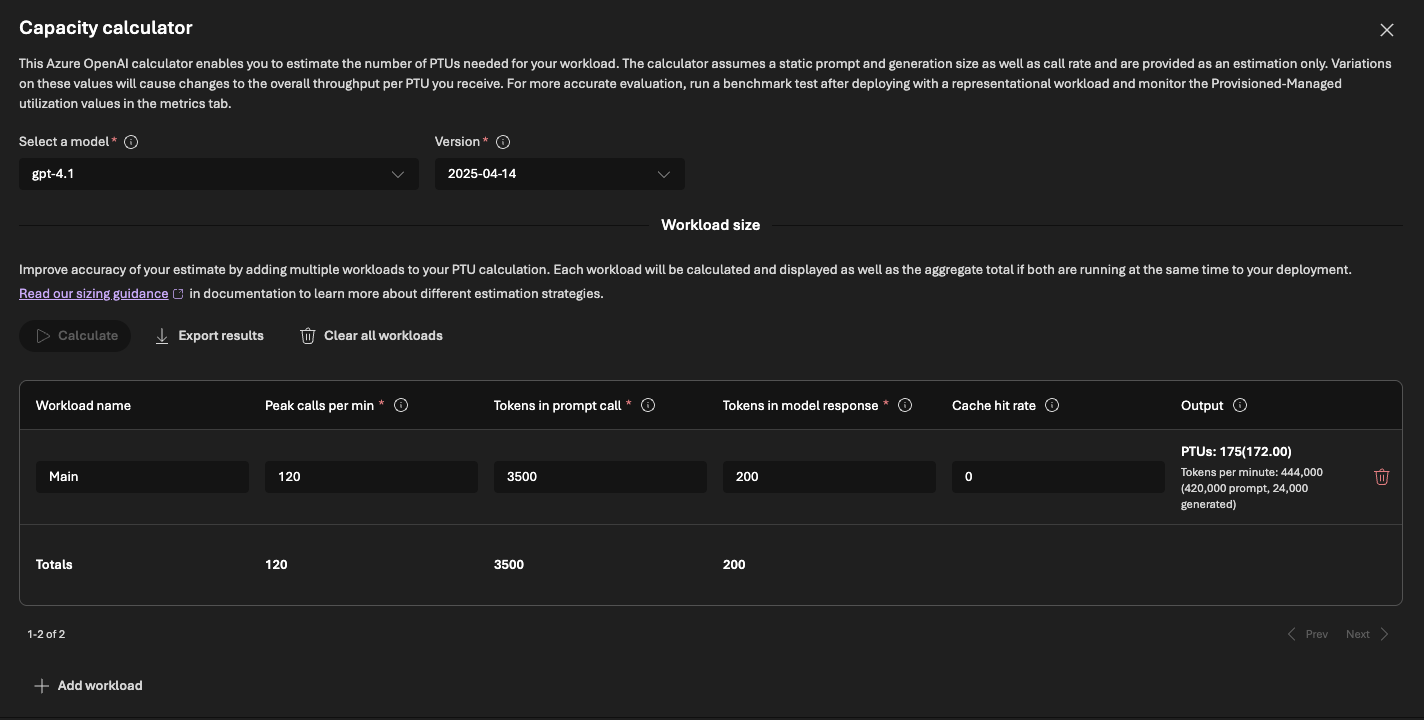
- Peak calls per minute: the peak traffic you want to cover. This is where your strategy matters (conservative vs. aggressive coverage).
- Tokens in (prompt): your average prompt size. Include system instructions, retrieved context (for example from RAG), safety instructions, and average user input length. Use telemetry when available; otherwise a manual estimate is acceptable.
- Tokens out (completion): the average response length generated by the model. Measure this from telemetry or estimate it from representative samples/evals.
- Cache: cache behavior can change throughput requirements. If caching is enabled in your architecture, account for it; if not, leave this as-is.
This gives you a practical PTU estimate to use for planning and quota requests.
2. Request quota increase
Once you have your PTU number, you need to request quota increase. This is done via quota request form
Before you can deploy a single PTU, you need quota. Quota is your total PTU allowance in a given region — set by Microsoft per subscription, per region, and per deployment type. It is a ceiling: quota itself is free, and you only pay for the PTUs you actually deploy against it.
Quota is scoped across three axes: subscription, region, and deployment type. In practice, each unique combination is a separate quota pool.
If you want to count how many distinct quota pools exist, the simple rule is:
#pools = #subscriptions x #regions x #deployment_types
The diagram below shows a subscription with a 500-PTU quota in one region. Two models are deployed against it (consuming 300 PTUs), leaving 200 PTUs of headroom you can deploy at any time without requesting more.
Quota is also model-independent: the same pool can be spent on any supported model, which is why a single 500-PTU allowance covers both GPT-4.1 and DeepSeek-R1 below. You don’t request quota per model.
PTU pricing, regional availability, and quota rules shift over time, so treat the numbers here as illustrative rather than current. For the authoritative and continuously updated details, see Microsoft’s official docs on Provisioned throughput for Foundry Models and Provisioned throughput billing and cost management.
3. Deploy your PTU
Quota only grants permission — nothing is running and you’re charged nothing until you actually create a provisioned deployment against it. This is the step where the pipe finally gets installed: you create a deployment, choose a provisioned SKU (Global, Data Zone, or Regional — whichever matches the quota pool you were granted), and set its PTU count to the number you computed in step 1. The moment it goes live it starts billing hourly, prorated to the minute, whether or not a single request flows through it.
You can do this from the Foundry portal — your model → Deploy → pick a provisioned deployment type → set the PTU count — or from the CLI:
az cognitiveservices account deployment create \
  --name <myResourceName> \
  --resource-group <myResourceGroupName> \
  --deployment-name <myDeploymentName> \
  --model-name <model> \
  --model-version <version> \
  --model-format OpenAI \
  --sku-name GlobalProvisionedManaged \
  --sku-capacity <ptuCount>
A few things worth knowing before you click deploy:
- Billing is hourly by default. You pay for every PTU you’ve deployed for as long as it’s deployed — this is the expensive, on-demand rate for capacity. A reservation (step 4) is what brings it down.
- You can resize anytime. Increase or decrease the PTU count later in the Foundry portal or via the deployment API — billing adjusts to the new count immediately, prorated to the minute, with no delete-and-recreate. (The CLI has no dedicated
updateverb here; re-runningdeployment createwith the same--deployment-nameand a new--sku-capacityperforms a create-or-update.) - Scaling down releases capacity permanently. Freed PTUs go back to the regional pool, and there’s no guarantee the same capacity is available if you scale back up — so don’t shed PTUs you’ll want again next Monday morning.
4. (Optional) Buy a reservation to cut the cost
At this point you have a working PTU deployment billed at the hourly rate. If your usage is steady — that floor demand we keep coming back to — paying hourly leaves money on the table. An Azure Reservation is a financial commitment (1‑month or 1‑year term) to pre‑pay for N PTUs at a large discount versus the hourly rate.
The thing that trips people up: a reservation deploys nothing and grants no capacity. It’s purely a billing discount that automatically maps onto whatever provisioned deployments you already have. So the three layers stay independent:
- Quota, no deployment → allowed, but nothing running — you pay $0.
- Deployment, no reservation → running, paying the expensive hourly rate.
- Deployment + reservation → running, paying the cheap committed rate.
- Reservation, no (or smaller) deployment → you committed financially but aren’t using it = wasted money (Azure calls this unused reservation coverage).
That last bullet is the trap: because scaling a deployment down doesn’t shrink a reservation, dropping below your reserved PTU count means you keep paying for capacity you’re no longer running. Size the reservation to your floor, not your peak — the spiky top of the curve is better left on hourly billing (or on PAYG fallback) than locked into a year-long commitment.
A reservation is also flexibly scoped: you can point it at a single resource group, one subscription, a management group spanning several subscriptions, or your whole billing account — and you buy one per deployment type. Global reservations aren’t even region-bound, so a single Global commitment can discount Global PTU deployments across multiple regions at once.
And when your needs change, remember the deployment and the reservation move on independent axes. Scaling the deployment down is instant and penalty-free; the reservation is a term commitment with only three levers:
- Exchange — swap it for a new reservation of a different PTU quantity or term in the Azure portal. The new commitment must be at least the remaining value of the old one, the term resets, and you can’t cross deployment types (Global → Regional). Exchanges carry no fee and no annual limit.
- Cancel (refund) — return it for the prorated residual value. Azure isn’t charging an early-termination fee today (though it has signalled a possible 12% fee in future), and total cancellations can’t exceed $50,000 in a rolling 12-month window per billing profile or enrollment.
- Disable auto-renew — the low-drama option: let it lapse at the end of its term instead of renewing.
For the exact eligibility and fee terms, see Adjust reservations as your workload changes and Exchanges and refunds for Azure Reservations.
Handle overflow gracefully
Even when going for PTU you will potentially hit 429… It changes why you get a 429 though — it becomes a capacity limit you chose — yet it doesn’t make the error disappear. Two reasons keep it on the table:
- Traffic exceeds your provisioned ceiling. Unless you over-provision for every conceivable peak — which the strategy section argues is rarely worth it — some spike eventually pushes past your floor, and the service returns 429 the instant utilization hits 100%.
- Your PAYG fallback can itself be throttled. If you spill overflow onto a standard deployment, that deployment is back on shared TPM/RPM quota and can return 429 too. The fallback is not guaranteed.
So the handling code is still mandatory. Here’s what it looks like, built up in layers:
-
Honor the retry-after headers. Every 429 comes back with
retry-afterandretry-after-ms, telling you exactly how long to wait before the next call will be accepted. Sleep for that long, then retry — don’t guess at a backoff. The Azure OpenAI SDKs already do this for you, honoring the header automatically; the default ismax_retries = 2, and you can raise or disable it:client = OpenAI( api_key=os.getenv("AZURE_OPENAI_API_KEY"), base_url="https://<myResourceName>.openai.azure.com/openai/v1/", max_retries=5, # default is 2 ) -
Bound the retries and add jitter. Cap how many times you retry, and add a little randomness to each wait so that a fleet of clients all bouncing off the same 429 doesn’t resynchronize into a fresh spike a moment later.
-
Redirect overflow to a fallback. Rather than wait, you can act the instant the 429 lands and send the request to a second deployment — typically a standard (pay-as-you-go) deployment of the same model. This is exactly the “provisioned floor + PAYG peak” shape we keep coming back to: your PTU absorbs steady demand at the committed rate, and the spiky top spills over to per-token billing instead of erroring out. Azure can automate this with the spillover feature, which routes would-be-429 requests to a designated standard deployment. (Spillover is supported by Azure OpenAI models, but not by every family — DeepSeek and Llama, for instance — so check support first, and remember from above that the fallback can be throttled too.)
-
Degrade gracefully when everything else is spent. Once retries and fallback are exhausted, fail soft rather than hard — this is the airline chatbot from the opening, returning a friendly “high demand, try again in a moment” instead of a stack trace. Queue the request for asynchronous processing, serve a cached or cheaper answer, or drop to a smaller model. The user should never see the raw 429.
-
Observe all of it. Meter your 429 rate, retry counts, spillover volume, and utilization %. That telemetry is the feedback loop for capacity planning.
Conclusion
Designing a resilient LLM-based system is a two-part problem: capacity planning and error handling. Most teams get the second part right — they write retry loops, implement fallback deployments, and return graceful degradation messages when the model is unavailable. Far fewer invest equal energy in the first part.
That imbalance is understandable. Error handling is a software problem, and software engineers are trained to solve software problems. Capacity planning feels more like an infrastructure or finance decision — something to hand off to ops or revisit at the next quarterly review. But when you treat capacity as an afterthought, error handling becomes load-bearing. Your retries, fallbacks, and “please try again later” messages are no longer a safety net; they are the primary mechanism keeping your product from falling over. That is a fragile position to be in.
PTU is the tool that shifts the balance. By reserving a floor of dedicated compute, you eliminate the ambient 429 noise of shared quota and give your error handling code the breathing room it was always supposed to have — something to catch genuine edge cases, not routine traffic. The two layers reinforce each other: solid capacity planning reduces how often error handling fires; solid error handling ensures that when capacity is genuinely exhausted, the experience degrades gracefully rather than catastrophically.
Build both. Plan for capacity first, then plan for what happens when capacity isn’t enough.
Happy journey ;)